
2.3 KiB
Configure a custom server based on the firmware compiled by XiaGe
Step 1 Confirm the version
Burn the firmware compiled by Xiaozhi (version 1.6.1 or above) (https://github.com/78/xiaozhi-esp32/releases)
Step 2 Prepare your OTA address
If you follow the tutorial and use full module deployment, there should be an ota address.
At this moment, please use your browser to open your OTA address, for example my OTA address
https://2662r3426b.vicp.fun/xiaozhi/ota/
If it displays "OTA interface is running normally, number of websocket clusters: X", then continue.
If it shows "OTA interface is not running properly", it is probably because you have not configured the Websocket address in the Smart Console. Then:
-
- Log in to the smart console as a super administrator
-
- Click
Parameter Managementin the top menu
- Click
-
- Find the
server.websocketitem in the list and enter yourWebsocketaddress. For example, mine is
- Find the
wss://2662r3426b.vicp.fun/xiaozhi/v1/
After configuration, use the browser to refresh your OTA interface address to see if it is normal. If it is still not normal, please confirm again whether the Websocket is started normally and whether the Websocket address is configured.
Step 3 Enter network configuration mode
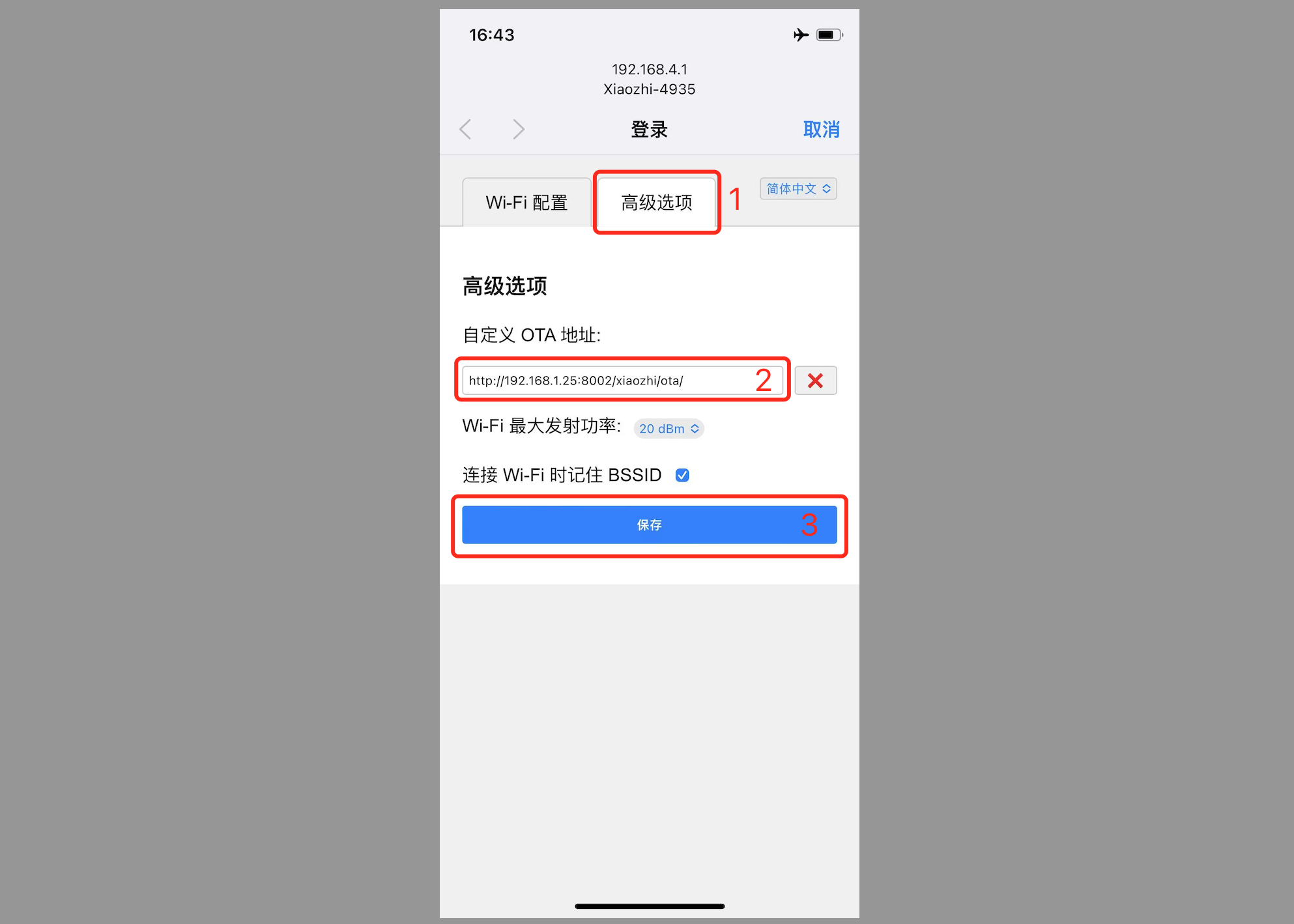
Enter the network configuration mode of the machine, at the top of the page, click "Advanced Options", enter the ota address of your server, and click Save. Restart the device
Step 4: Wake up Xiaozhi and check the log output
Wake up Xiaozhi and check whether the log is output normally.
Frequently Asked Questions
Here are some frequently asked questions for your reference:
1. Why does Xiaozhi recognize a lot of Korean, Japanese, and English in my words?
2. Why does the error "TTS task error file does not exist" appear?
3. TTS often fails and times out
4. I can connect to my own server using Wi-Fi, but not 4G
5. How can I improve Xiaozhi's conversational response speed?
6. I speak very slowly, and Xiaozhi always interrupts me when I pause.
7. I want to use Xiaozhi to control lights, air conditioning, remote power on and off, etc.